 |
||
|
Frequently Asked Questions |
||
| <1> Question: I purchased the CD from you, and now I have to unlock the application! Why do I have go through that step? | ||
| Answer: Many of our customers want the convenience of downloading from the internet and using it right away. So we implemented a Test-Drive of our software with our free downloads. | ||
| In addition, each copy of our software QuizShow is sold on the basis of installation and operation on one machine. Software Piracy is a huge problem in the computer industry (just type in "Software Piracy" from any search engine!). We believe that our programs are very reasonably priced, and to continue to offer them we have been forced to protect our software. | ||
| We hope that the additional step of unlocking the application will not cause undue hardships for those who are legitimate software customers of DEC Software. | ||
| With this the 'Try Before You Buy' approach, we encourage you to share our software with all of your colleagues. They will be able to use the software for the trial period without any problems. Then they can visit our web site and order the software! | ||
| |
||
| <2> Question: I want to put the software on my computer at home and the computer at work. What do I have to do? | ||
| Answer: Go to our website and order an additional unlock code. We have tried to be reasonable, by pricing the additional unlock codes at a significant discount from the full-priced software (you don't get that kind of a break from Microsoft, if you want a second computer to have Windows, you pay the full price!). | ||
| |
||
| <3> Question: Would you explain the Additional Unlocking Code? | ||
| Answer: Sure. In order to keep our prices low, as much at 1/20th the cost of some of our competitors, we utilize a system that ties our programs to you computer. We issue activation codes for each license purchased, similar to Microsoft's Windows licensing. But unlike most software companies that require unlock codes, we offer discounts on subsequent license purchases. | ||
| We encourage our customers to take advantage of our special pricing plan by offering 2 additional unlock codes for each full license for just $20 each. This lets you work on a desktop PC at home or the office and easily transfer your game files to a portable laptop or other PC for your presentation/lecture. | ||
| In addition to our additional unlock code special prices, we also offer discounts when you buy multiple programs. Our Classroom Suite plan allows you to select any 3 of our programs and save almost 20% while our Classroom MegaSuite plan lets you choose 5 programs and saves you 30% off the full price. | ||
| We also offer significant discounts for site licensing, quantity purchasing and distance learning. Click here to read more about these offers. | ||
| |
||
| <4> Question: I don't think that's right. Why can't I to put this software on as many machines as I want? | ||
| Answer: Your purchase was for one license, which means that you are entitled to use the program on one machine. | ||
| We don't wish to alienate customers, but we have documentation that one 'organization' bought one program and copied it onto over 30 machines. We are simply trying to keep our prices reasonable, and yet protect our investment of time and money in our software. Check out our competitors! One competitor charges $495 for their game software. If we charged that, we wouldn't concern ourselves with the piracy of software (in fact, we consider their price piracy!) | ||
| |
||
| <5> Question: We are having difficulty getting the iPhones (or Androids) to connect to the program. | ||
| Answer: The new technology does add an additional layer of difficulty to get the smart phone buzzers operational. | ||
| That's why we've created this PowerPoint Presentation to help you with the steps to get the smart devices to work. | ||
|
|
||
| |
||
| <6> Question: How can I quickly find out the answers to my questions? | ||
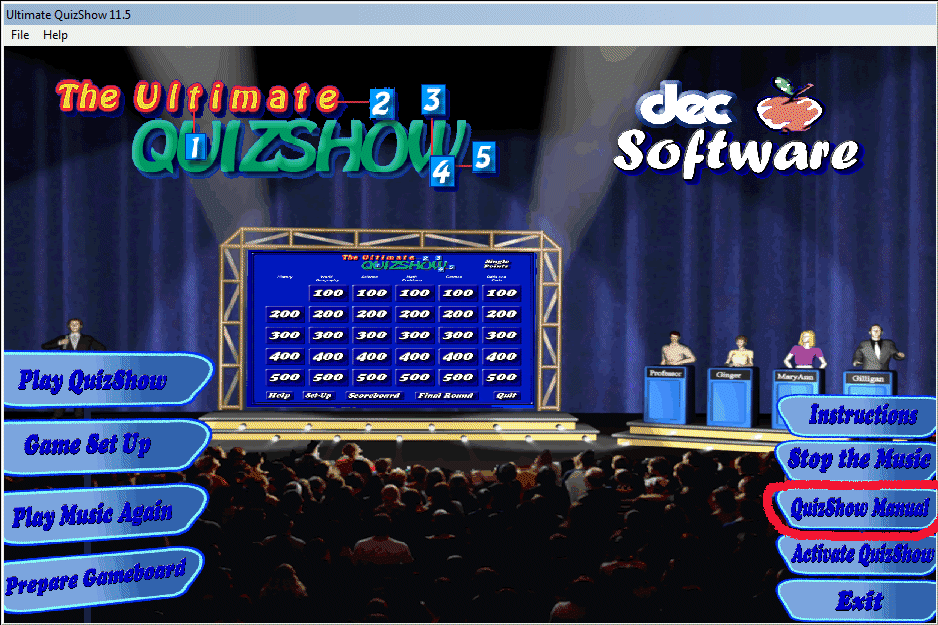
| Answer: 99% of the questions that are answered by our support staff are covered in the manual that is included with each program. Simply click on the <QuizShow Manual> button (The Ultimate QuizShow shown below) that is presented in the opening screen. | ||
 |
||
| Not to put too fine of a point on this answer, but most people simply do not read the instruction manual. We have spent a great amount of time incorporating the questions that our customers have asked, into the manuals. However, if you have a question that isn't covered in our manual, please email us. Be sure to include the order number, the program name and the version number of the program that you are working with. We make every effort to answer our emails within 2-3 hours (on a business day). |
||
 |
||
| |
||
| <7> Question: Why don't you have phone support? | ||
| Answer: We sell our software worldwide. This type of sales is not conducive to phone support. The cost would be prohibitive, and of course, we would have to pass this on to the consumer. | ||
| 99.5% of our questions are either answered in the manual (see question 6 above), or can be answered easily by e-mail. We attempt, during M-F business hours, to get emails answered within 2-3 hours. | ||
| Then consider this exchange with a customer, who after 15 e-mails, we finally relented and called. Our support person (we'll call him Byron), was placed on hold for over 10 minutes. At this point, Byron was cut off. Ten minutes later (thanks to caller ID) the customer called back. The following is a word-for-word transcript of our On-Star conversation with the customer (the names and order number have been changed to protect the innocent). | ||
| Byron: OK. What's on your screen right now? | ||
| Customer: Wait, I have to get to my computer. | ||
| Five minutes pass. . . phone transfers . . . clicking . . . elevator music . . . . heavy breathing | ||
| Customer: OK. I'm at my computer. | ||
| Byron: OK. What's on your screen right now? | ||
| Customer: Nothing, let me get this computer going. | ||
| Byron: OK. | ||
| Five minutes pass. | ||
| Byron: What happens when you start the program? | ||
| Customer: The little activation box comes up on the screen. | ||
| Byron: What happens when you type in the activation code that I sent to you in the e-mail? | ||
| Customer: It says code not properly defined. | ||
| Byron: Did you use copy and paste, to eliminate any transcription errors? | ||
| Customer: Yes. | ||
| Byron: What code did you type in? | ||
| Customer: 2076. | ||
| Byron: That's the order number. When I sent you the activation code, it included the following: | ||
| Order number: | 2076 | |
| MID Code: | 3456-AE56-3412-2234 |
|
| Site Code: | 34589102 | |
| Activation Code: | 4567-9823-A345-2345-A894 (activation code) | |
| Customer: I see. Would you send that activation code again? | ||
| Byron: Sure (under his breath) I've sent it to you 3 times. Once I even sent you an e-mail that only had that number in it, everything else was blank. | ||
| Byron: (under his breath again) Why would you use copy and paste for a number like 2076? | ||
| Byron: (under his breath again) When is my vacation? | ||
| Byron: (under his breath again) I hope she only bought one program. | ||
| Byron: Have a nice day! | ||
| |
||
| <8> Question: I 'm having some difficulty getting my gamepads to work with your programs. Can you help? | ||
| Answer: It is possible that you need to upgrade your DirectX drivers from Microsoft. Here is the URL of the DirectX drivers (Version 9). Download and install them on your machine. | ||
| |
||
| <9> Question: I have already submitted and received an authorization code for my software. Later when I tried to start the program, I needed another authorization code (in other words, the MID and Site codes had changed). | ||
| Answer: Occasionally a user may use software that changes the Windows registry (Norton SystemWorks in notorious for 'playing' with the registry). In these cases we may have to supply a new authorization code for you. Send us the new MID and Site codes, along with your order number and we will send a replacement code to you within 2-3 hours (on a business day). | ||
| In addition, if you perform any of the following functions on your computer, you will need a new activation code (this information is included with your activation code email. | ||
| - reformat the hard disk drive | ||
| - change your operating system | ||
| - flash the motherboard BIOS | ||
| - change the system registry | ||
| |
||
| <10> Question: Okay. I messed up. I didn't read the activation email and upgraded to a different operating system. Now the program doesn't work and I have new MID and Site codes (also, we recognize that some customers upgrade and don't even think about the licensing of our software). | ||
| Answer: That's not a problem. Send us the new MID and Site codes, along with the order number, and we will send a replacement code to you within 2-3 hours (on a business day). | ||
| However, if you are putting the software on a different machine (our licensing software can detect that), please purchase an additional activation code. | ||
| |
||
| <11> Question: I use a notebook computer and the MID and Site codes keep changing. What's going on? | ||
| Answer: If a notebook computer is used in different configurations (say docked or undocked) then our licensing software 'sees' the different arrangement as a different computer. Currently, our licensing software specialist is seeking a 'workaround'. | ||
| The safest procedure for notebook computer users, is to decide which configuration that they will use the software in, and supply the MID and Site codes for that arrangement. | ||
| |
||
| <12> Question: I would like the game to sound more like a TV game show. What can I do? | ||
| Answer: We have purposely designed our software so that the sounds can be very easily replaced. | ||
| As an example, the opening music to The Ultimate
QuizShow is stored in the c:\Program Files\QuizShow\bin subdirectory
with the name "QuizShow Theme.wav". So, all you need to do is : |
||
| 1. Search the internet for the music that you want to use. 2. Download the music to that subdirectory. 3. Delete the "QuizShowTheme.wav" file. 4. Rename the downloaded wav file to "QuizShow Theme.wav". |
Possible links for music or sound files: http://www.findsounds.com/index.html http://www.externalharddrive.com/waves/waves.html |
|
| |
||
| <13> Question: I don't like the music that came with the software. What can I do? | ||
| Answer: Of course, you can always turn off the speakers, but most customers would still like to hear the other sound effects. | ||
| Go to this page, for instructions on how to replace the music with a wav file of your choice. | ||
| |
||
| <14> Question: How come I can only see part of the screen when running The Ultimate QuizShow? |
||
| Answer: Try to adjust the display
characteristics of your monitor. This corrects most of the problems
caused by this. The directions for Windows 98 are (Windows 2000, Windows Vista,
Windows 7 and Windows 8 are just slightly different.): |
||
|
||
| |
||
| <15>
Question: Can the sound effects for the YES and NO responses be
replaced with sounds of the user's choice? |
||
| Answer: Yes. You may use the built-in feature (discussed on the setup page), or use the following scenario: | ||
| Step 1. Use a microphone and record the sounds that you want to use, using a program like Sound Recorder. | ||
| Step 2. Name these files "yes1.wav" , "yes2.wav", "yes3.wav", "yes4.wav","yes5.wav", "no1.wav", "no2.wav","no3.wav", "no4.wav" and "no5.wav" | ||
Step 3. Copy them to the c:\QuizShow\bin subdirectory. They will overwrite the sound files that are located there. |
||
| Step 4. Likewise, the TEAM sounds, "team1.wav", "team2.wav", "team3.wav" and "team4.wav" can be replaced. Follow steps 1-3 to replace these sounds. | ||
| |
||
| <16> Question: I get a corrupt file or the program won't install after I download from your site. What's going on? | ||
| Answer: The most common cause of this problem is when a computer is located behind a firewall. You may have to contact your system administrator in order to download the'.exe' file for you. If this doesn't seem to be the problem, contact us and we'll check the integrity of our file. | ||
| |
||
| <17> Question: What is your refund or return policy? |
||
| Answer: Since all our software is available in downloadable as demo programs, it is the user's responsibility to determine if the software is suitable. We do not offer refunds or returns. Of course, we do replace CD's that are damaged during shipping. In addition, we will do everything in our power to get our software running properly on your machine (this offer is not valid for sewing machines!). | ||
| Please, download the software, try it out and then purchase the software if you desire. | ||
| |
||
| <18> Question: I have developed a game on my computer at home, how do I transfer it to my notebook computer to 'go on the road'? | ||
| Answer: Assuming that you have purchased licenses for both computers, installed the game on both computers and then 'activated' the software on both computers, here is what you need to do (also, let's assume the program is The Ultimate QuizShow): |
||
| Step 1. Using a program like Windows Explorer, copy the question files (the file and extension will be something like 'sample.qsa' ) from the C:\programs\QuizShow\ subdirectory to a flash drive | ||
| Step 2. Using the same program on the target computer, copy the question files from the flash drive to the c:\programs\QuizShow\ subdirectory. | ||
| Step 3. Follow the same method to copy any sound files from the from the C:\programs\QuizShow\sounds subdirectory to a flash drive and then to the target computer. | ||
| Step 4. Follow the same method to copy any graphic files from the from the C:\programs\QuizShow\pics subdirectory to a flash driveand then to the target computer. | ||
| |
||
| <19> Question: I changed the logo for The Ultimate QuizShow to First National Bank's Review Game. Every time we restart the program, we have to change the logo again. How do I get our logo to 'stick'? | ||
| Answer: This is by design. We allow our customers to change the logo to suit their needs, but we retain all copyright priviledges associated with the program, especially when the program is first loaded. | ||
| Actually, if you stop and think about it, we've responded to our clients' requests to allow them to change the logo so that they could play 'their game'. But we also think it's reasonable to maintain our trademark and our copyright for the program. | ||
|
|
||
| |
||
| <20> Question: How can we develop an entire game for Classroom Feud? We are continually returned to the opening menu while we play the game. We want to put all the questions into one file. | ||
| Answer: That's the way the Classroom Feud is designed to operate. After each round, the user is returned to the opening menu and then chooses whether to play 'Single Points Feud', 'Double Points Feud', or 'Triple Points Feud', | ||
| If you think about it, you have more control of the game that way. If you decide to play more or less rounds, you have complete flexibility to move to different point value rounds. When you have about 10 minutes left in your schedule, you can move to the 'Fast-Money' round. | ||
| Of course, before playing the game with a group, enter several questions (rounds) with their answers. A quick reminder, print out your questions and answers, so the MC will be able to reveal the correct responses. | ||
| <21> Question: During Classroom Millionaire, how do you monitor that in the game to avoid the other teams getting an unfair advantage since they are all playing at the same time? | ||
| Answer: That's a very good question and one that we don't have an iron-clad way of preventing the 'unfair' advantage. | ||
| We've always just had the teams look away, or close their eyes. Along with this, if other teams don't want to use a 50-50, we say: | ||
"All-right, team
1 wants to use a 50-50, the other teams, you're locked into the
answer that you've given, right?" |
||
| We're open for suggestions, but have used this little speech more than once: | ||
"c'mon guys,
this is just a fun game, be honest!" |
||
| With stubborn teams, we've just resorted to, "OK, everybody is gonna use the 50-50 for this question." | ||
| We're working, but this is sometime off in the future, for giving the team that uses a 50-50, feedback on their polling device. | ||
| <21> Question: What do I do about an error that pops-up when running the smart phone enabled software? | Component 'MSWINSCK.OCX' or one of it's dependencies is not correctly registered; a file is missing and invalid |
|
| Answer: Your computer doesn't have this file properly installed and/or registered. You will find the answer to this about 1/2 day down on this page. | ||
| Best
viewed in 800x600 resolution |
||
| Copyright
©2012 - 2017 DEC Software. |
||
 |
| We
encourage everyone to download our demo software and give it a spin
before purchasing, that's how confident we are that you will love
our products. Our product demos are fully functional versions (with the exception being that when you play the game, you are only allowed to play the Sample Game included with the demo). Using the demo, you can test all the functionality of the program. Once you decide to keep the software, simply return to this website and order the download version or the CD and we will contact you with information on how to download and activate the full version of the software. |
 |
|
What our
customers are saying
|
| "We just recently ordered your software and we just love it." |
|
Kathryn.Dame@jdcu.com
|
| "The software is great and the price is unbeatable!" |
|
gastrodr@hotmail.com
|
| "Got the game in the mail
yesterday. It was all I thought....and more....great program" |
|
dmclaren@uky.edu
|
| "Thanks for your excellent software and outstanding technical support!" |
|
gastrodr@hotmail.com
|
 |
|
|
 |
|
|
 |
|
|
 |
|
|
 |
|
|
 |
|
|
 |
|
|
 |
|
|
 |
|
|
 |