 |
|
| We
encourage everyone to download our demo software and give it a spin
before purchasing, that's how confident we are that you will love
our products. Our product demos are fully functional versions (with the exception being that when you play the game, you are only allowed to play the Sample Game included with the demo). Using the demo, you can test all the functionality of the program. If you decide that the software is for you, simply return to this website and order the download version or CD. |
|
 |
|
| Download
|
|
| Ordering |
|
| Pricing |
|
| GameShow
Live |
|
| Download |
$49.95 |
| CD |
NA |
| "I tried the software last week and people loved it. Quite a deal. I had so much resistance when I came up with this idea. There were people that refused to take part, but once they were there, got totally caught up in it. It was an excellent tool for review training." | |
| freda.m.sojka@monsanto.com |
|
| "I just received my order for two of your classroom games. They are wonderful! . . . Thanks for your help and for creating software to help keep kids motivated! " | |
| toepp@mindspring.com |
|
| "We're using it in our residency training programs such as Emergency Room, Pediatrics and Internal Medicine. Congratulations on a very nice product." | |
| DrPieper@home.com |
|
| "Thanks for your excellent software and outstanding technical support!" | |
| gastrodr@hotmail.com |
|

| Liven up any presentation or classroom!
|
| Complete
Makeover for GameShow Live |
 |
| "A Jeopardy
Style TV Game Show Program" |

|
|||||||||||||||||||||||||
|











Stimulate your students' interest level with this innovative classroom review game that is patterned after the Jeopardy TV version of the game. GameShow Live is perfect for history, science, foreign languages, business, medical education, legal training or just for a break during your presentation or class instruction.

 Complete
customization of GameShow game board
Complete
customization of GameShow game board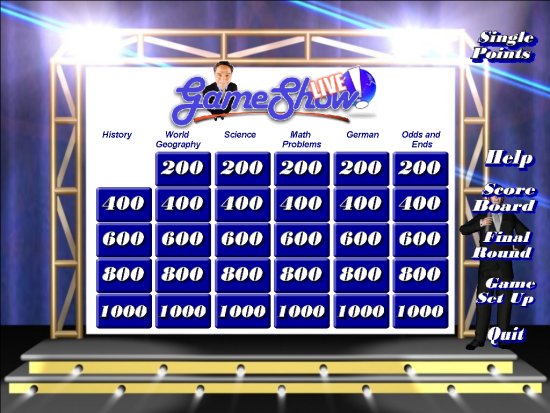 Use our logo, or your
own. (Clicking
here opens a new window to see this feature) All
categories, answers and questions are supplied prior to "airtime,"
by you, the instructor Play
with up to 4 players or 4 teams. Use our players or import pictures of your
own. (Clicking
here opens a new window to see this feature) Automatic
scoring by the computer Add
graphics, videos (AVI, MPG, WMV and MP3's) or sound files to your games Answers
are displayed in the font size determined by the length of the 'answer'
and question Complete
3-D graphical interface (Clicking
here opens a new window to see screen shots of GameShow Live!).
Use our logo, or your
own. (Clicking
here opens a new window to see this feature) All
categories, answers and questions are supplied prior to "airtime,"
by you, the instructor Play
with up to 4 players or 4 teams. Use our players or import pictures of your
own. (Clicking
here opens a new window to see this feature) Automatic
scoring by the computer Add
graphics, videos (AVI, MPG, WMV and MP3's) or sound files to your games Answers
are displayed in the font size determined by the length of the 'answer'
and question Complete
3-D graphical interface (Clicking
here opens a new window to see screen shots of GameShow Live!).Actual Game Screen Shots
Dual
monitor support Simple
question and category setup (you can have a complete game prepared in
under 15 minutes)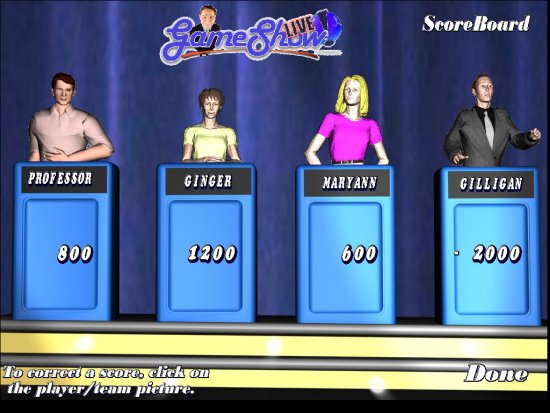 Six
categories of five answers are displayed on the screen Set
various point values for each question Ability
to play multiple rounds, by doubling or tripling the point values Unlimited
bonus questions The
GameShow Final Round
Six
categories of five answers are displayed on the screen Set
various point values for each question Ability
to play multiple rounds, by doubling or tripling the point values Unlimited
bonus questions The
GameShow Final Round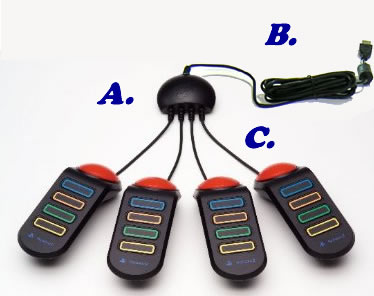 Support
for wired PS2 Buzzers and wireless
Buzzers. Lively
music (use the music that we supply or easily change the music to that which
you have access to) Support
for up to 2 keyboards (we recommend the P.I. Engineering - Y-Key, Key Dual
Keyboard Splitter available from TigerDirect.com,
search for "splitter")
Support
for wired PS2 Buzzers and wireless
Buzzers. Lively
music (use the music that we supply or easily change the music to that which
you have access to) Support
for up to 2 keyboards (we recommend the P.I. Engineering - Y-Key, Key Dual
Keyboard Splitter available from TigerDirect.com,
search for "splitter")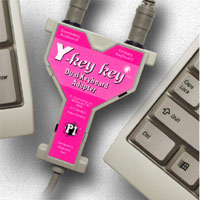 Support
for up to 4 USB gamepads. We've found that nearly any USB gamepad will work,
even the least expensive gamepads from Wal-Mart
Support
for up to 4 USB gamepads. We've found that nearly any USB gamepad will work,
even the least expensive gamepads from Wal-Mart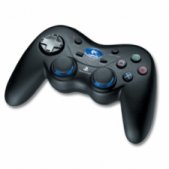 Support
for other buzzer systems (email us for our recommendations)
Support
for other buzzer systems (email us for our recommendations) 
| Complete Customization
- Add Your Own Logo |
 |
| Example
Logo |
Best
viewed in 800x600 resolution
Copyright
©2012 - 2017 DEC Software.
GameShow
Live is a Jeopardy style program that is fun for the classroom or business
presentation!